Keep track of Mom's care by talking.
Say what happened after the appointment. Centis writes it down, keeps it in order, and has the answer when anyone asks what's going on.
No app store, and you can use it on your own without an account. Works in your phone's browser. Keeping your own record is free and stays free; some additional features will be part of a paid plan later.

- Your notes stay on your phone. No account and no copy on our servers. To write down what you say, it's sent to OpenAI for processing, and we don't keep it. Where your notes go
- You check everything first. Every line before it's saved, and every family update before it's sent.
- A memory aid, not a medical monitor. No advice, no alarms, no guessing. What it won't do
Sound familiar?
SamHow did the appointment go?
AdaDid they change any of her medications?
SamWhat did the doctor say about the dizziness?
Hang on, let me think…
You were in the room. You heard all of it. A week later it's in pieces, and everyone is asking you.
Centis writes it down for you, in your words, with the dates, so the answer is there when they ask. See how it works.
See it in 30 seconds
A walkthrough with an example record. Some waits are shortened, and the family's reply is acted out.
How it works
Thirty seconds after a visit, and it keeps the rest.
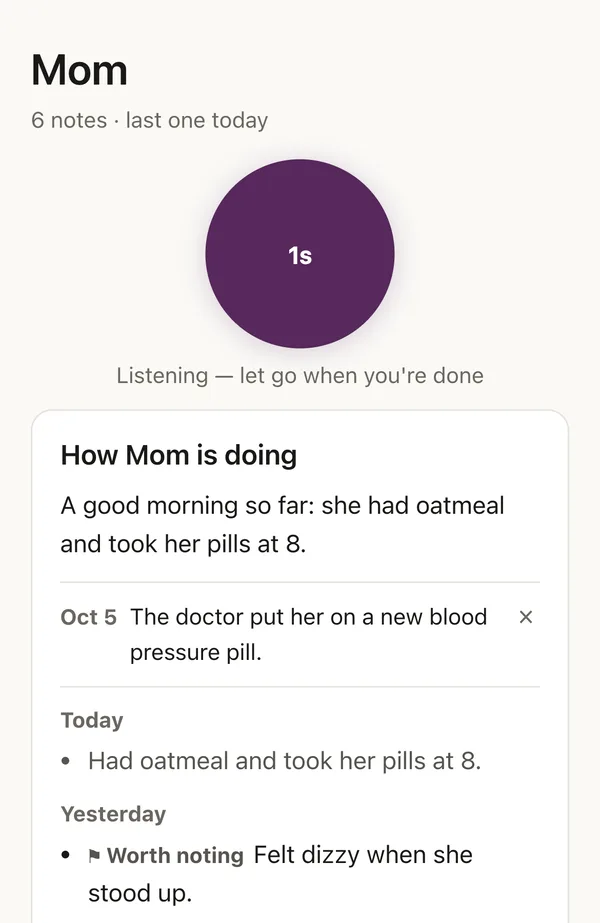
- 1Just talk
Say what happened.
Hold the button after an appointment, a phone call, or a day when something felt off. Talk the way you'd tell a friend.
- 2It writes it down
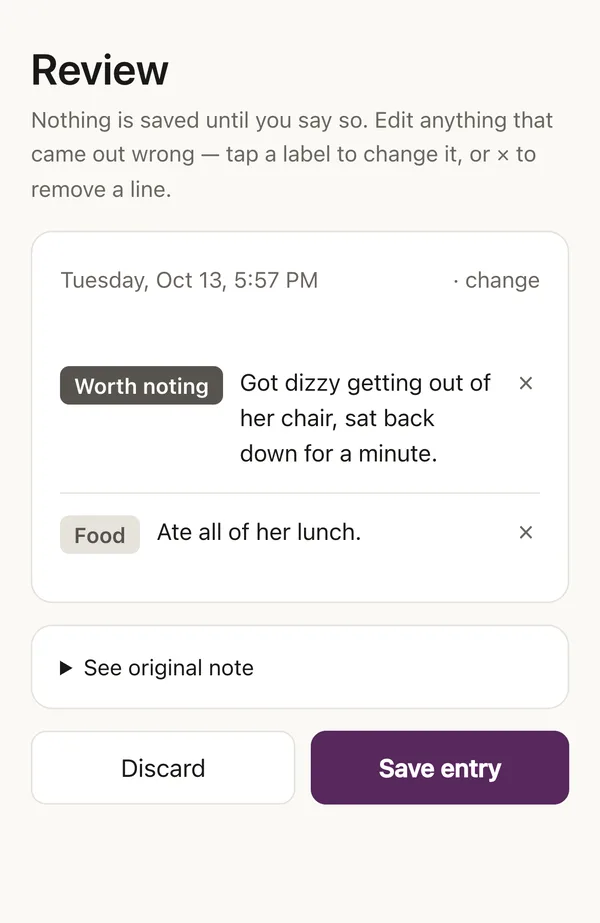
In your words. Dated.
You see every line before anything is saved, and can change or remove any of it.
- 3Just ask
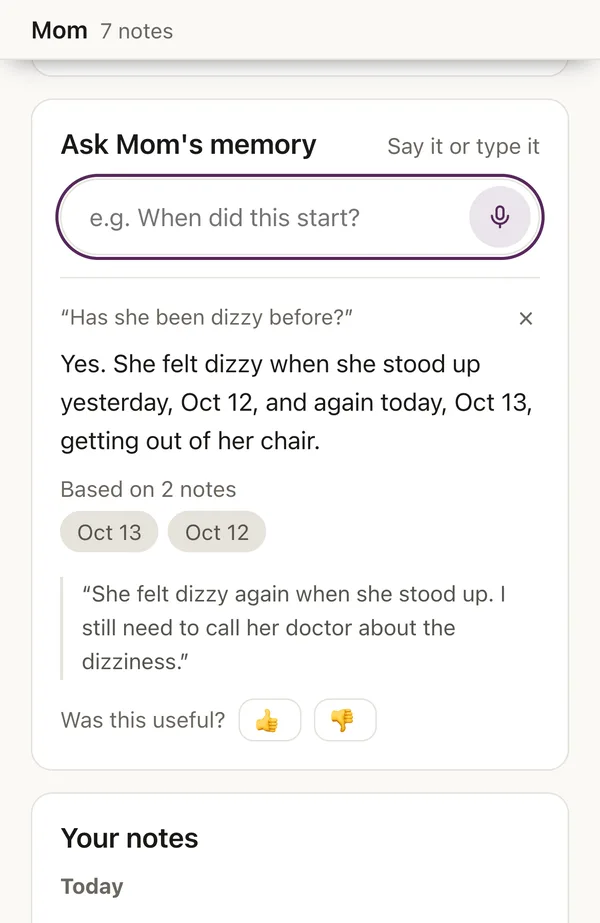
It remembers the dates.
Say it or type it. Ask what happened before and get the dates back, with your own note to show where the answer came from.
- 4Before the visit
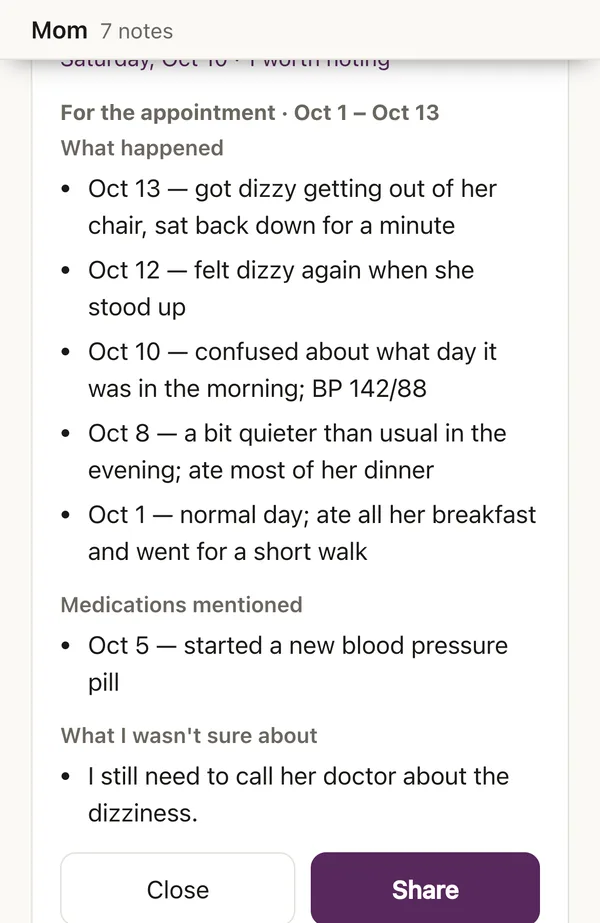
Everything on one page.
What happened, medications mentioned, and what you weren't sure about, newest first, ready to read from or share.
- 5The family
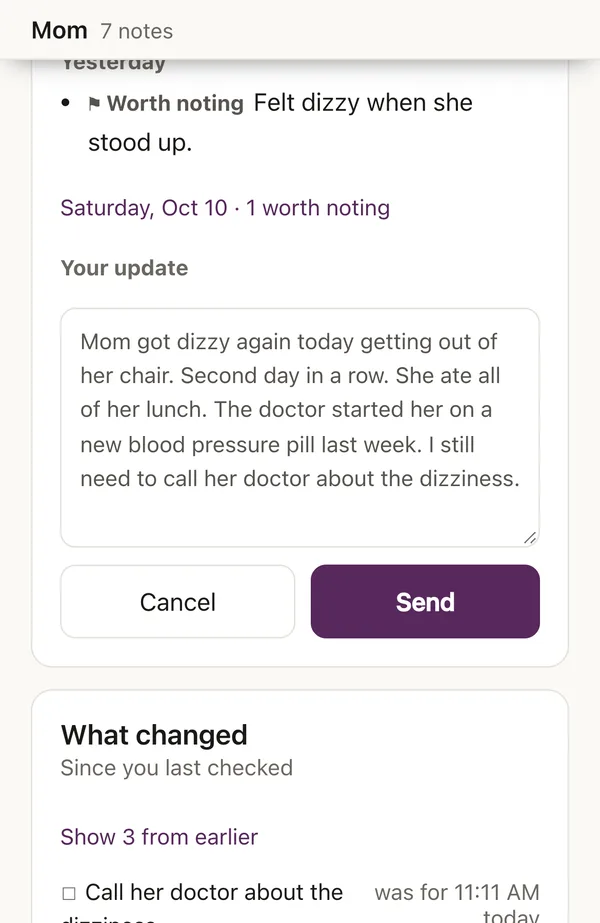
Keep everyone posted.
It drafts an update for your brother or sister in plain words. You read it first, then send it by text or email.


What it won't do
- No medical advice. No dosages, no interactions, no “you should call the doctor.” Ask whether something is serious and it tells you what you noted and when.
- No alarms. Nothing flashes red. It's a memory, not a monitor.
- No guessing. It never links two things you didn't link yourself, and if your notes don't say, it says so.
Where your notes go
Your notes stay on your phone. There's no copy on our servers. We can't read them, because they aren't anywhere we could look.
To turn your voice into a written note, the recording passes through our servers to OpenAI and back. Asking a question or drafting a family update sends your notes the same way. We keep none of it. OpenAI doesn't train on it, and may hold it for up to 30 days to check for abuse.
Because notes live on your phone, save a copy from time to time. It takes one tap, and it's how you move to a new phone. The full privacy policy.
Free for caregivers
- Aging parents checklistA printable page for your binder: what to keep in one place.
- Before the appointmentA one-page template to fill in the week before a visit.
- Where to start (US)Help at home, Medicare questions, memory loss, a break, veterans: who to call.
Questions
Is it really free? What will cost money later?
Keeping your own record is free, and stays free. That means talking to it, your timeline, asking questions, the summary for an appointment, and sending updates to your family — all of it, for as long as you use Centis. Whatever you save is yours to read and take with you.
As Centis grows, some additional features and services will be part of a paid plan. Family sharing is one we're planning — letting the rest of the family open the same record themselves — and we expect that plan to be around $14.99 a month for a whole family when it's ready.
It doesn't exist yet, and saying so now is better than surprising you with it later. Centis has to pay for itself to keep running, and that's where it will come from.
Who is it for?
Anyone looking after a parent, spouse, grandparent or friend, especially when things are changing: a new diagnosis, a hospital stay, new medications, memory problems.
Can my siblings see it?
Not directly. Centis writes an update you can send them by text or email in a tap. A record the whole family can open themselves is something we're considering, not something we've promised.
My parent doesn't use a smartphone. Does that matter?
No. Centis is for you, the person keeping track. Your parent doesn't need to install anything or do anything.
Can I keep some things private?
Everything is private to start with. Your notes stay on your phone, and nobody else sees them. A family update only goes out when you send it, and you can change or remove any line first.
What happens to my notes if I stop using it, or don't pay later?
They stay yours. Keeping your own record is free, so nothing you've saved is ever locked behind a plan. You can save a copy of everything at any time.
iPhone or Android?
Both. Open centis.app in your browser, then add it to your home screen so your notes are kept safely.
Does it work in Spanish?
Not yet. When it comes, it will be built properly rather than translated, so it understands how people actually describe a hard day.
Care managers and support groups
If you work with families and want to know more before mentioning Centis, write to hello@centis.app. Happy to walk you through it.
Talk. It remembers.
Start now. It's free.